Getting started
The settings section is allowing technical administrators to configure the importation of data into QuartzX platforms (QuartzIQ, QuartzPilot, QuartzID and QuartzGov).
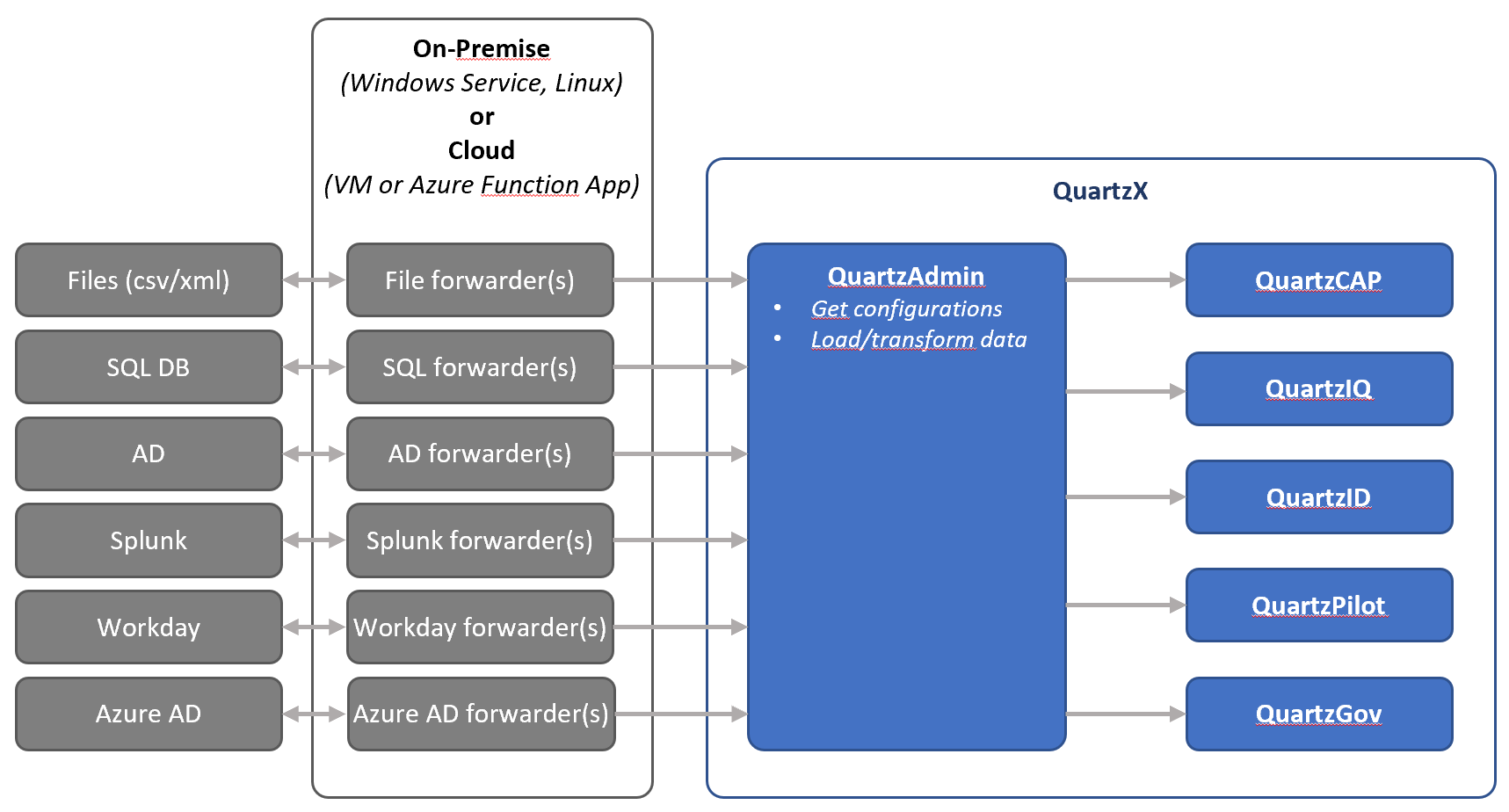
QuartzX provides you with many built-in data connectors allowing you to easily import data into our platforms. We currently support these types of connectors:
- Files (csv and xml)
- SQL Databases
- Azure AD
- AD
- Workday
- Splunk
These data connectors are called Integration Agents and connect directly with our API to get its configuration and to load the data. These Integration Agents, depending on the type, can be installed on premise or on cloud servers.
Integration Agent Architecture
Load data into any QuartzX platform Other relevant resources
Load data into any QuartzX platform
As stated above, in order to load data into QuartzX platforms, you must install Integration Agents and configure them in our QuartzAdmin application. Below are the steps you must complete in order to load data:
- Create a Integration Agent
- Install the Integration Agent
- Create a Source Data
- Create one or multiple Target Data using the Source Data
- Create one or multiple Connection Mappings.
- Create an Integration Task
- Execute the Integration Agent (launch the executable file)
Other relevant resources
You can also find more information in the articles listed below: